

How to read an SMTP bounce, not the tea leaves
A bounce says exactly what happened, if you read the number instead of the sentence. The 4.x.x and 5.7.x codes per provider, what each one really means, when to retry.
A bounce comes back. Someone forwards it to you with "any idea?" in the body. You skim the English sentence at the end, decide it sounds like SPF, and spend the afternoon editing a TXT record that was never the problem.
The bounce told you what happened. It said so in three digits, near the start, before any of the prose.
Every provider writes its rejection text differently, and some of them write it badly. The numeric codes are standardised, so they're the sturdier half of the message. They aren't identical everywhere, though. Google and Microsoft both mint codes of their own, and a couple of Google's collide head-on with the registered meaning1. But the standard part gets you most of the way in about ten seconds.
In short, the first digit tells you whether the bounce is temporary or permanent. The middle digit tells you what kind of problem it is. The sentence at the end has the specifics, if the provider wrote a useful one.
Is it a 4 or a 5? Start there.
The first digit tells you whether to do anything at all. It's the split the words soft bounce and hard bounce are pointing at.
4xx / 4.x.x   temporary: your server will retry on its own
5xx / 5.x.x   permanent: retrying this message unchanged is unlikely to help
A 4 is a soft bounce, or a deferral. The receiving server is saying "not now", and your mail server keeps trying on a schedule without being asked. Postfix keeps a deferred message queued for five days by default before it gives up2.
A 5 is a hard bounce. RFC 3463 defines it as a failure "not likely to be resolved by resending the message in the current form"3. Something about the message or the destination has to change first. In practice the message has already gone back to the sender, and waiting isn't the thing that changes.
Our take: a single 4.x.x in a log isn't an incident. It's the protocol working. What deserves attention is the same 4.x.x for the same destination that never clears. How long it has lasted doesn't tell you why, so read that deferral's code and sentence.
What do the three numbers actually mean?
An SMTP enhanced status code is a class, a subject and a detail, in that order, defined in RFC 3463. Read it left to right and each digit narrows the answer.
The middle digit is the one nobody uses, and it's the most useful. RFC 3463 gives most subjects a stated owner, and that's where the popular shorthand goes wrong:
X.1.x   addressing: the address itself; the sender can usually correct it
X.2.x   mailbox: the box exists but can't take this message; the recipient's
X.3.x   mail system: the receiving system, not this mailbox
X.4.x   network / routing: connections, DNS, loops, expiry
X.7.x   security / policy: auth, reputation, filtering; either side, or both
So 5.1.1 is permanent + addressing + "no such mailbox". 4.2.2 is temporary + mailbox + "the box is full right now". 5.7.26 is permanent + policy + "more than one authentication check failed". Once the middle digit is in your head, you can place a code you've never seen before. That matters, because providers use codes the registry doesn't list, and give some registered ones meanings of their own.
Our take: the middle digit is a category, not a blame allocator. The widespread reading that X.7.x means "your fault" isn't what the RFC says. Security and policy issues are "under the control of either or both the sender and recipient", so a 5.7.x can be the receiver's filter just as well as your DNS. The digit that does point at the sender is X.1.x, addressing, where the RFC says the errors "can generally be corrected by the sender"3. Usually that means fixing the address you typed.
Which codes can you actually act on?
Forget fault and ask what you can change. Some codes describe the address you sent to. Some name something on your side of the wire. Some record a decision the receiver made about you without saying why.
Codes that describe the address, not you
5.1.1   mailbox does not exist (typo, or the person left)
5.1.2   bad destination system: the domain can't take mail at all
5.2.1   mailbox disabled, not accepting messages
5.2.2   mailbox over quota
Every one of those is a fact about the address or the box behind it. The fix is a corrected address, or a phone call. Editing your DNS won't help. A 5.1.1 that keeps bouncing on a mailing list is a list-hygiene job.
5.1.2 is wider than the "no MX record" gloss it usually gets. The registered wording is that the system to the right of the @ "does not exist or is incapable of accepting mail"3. That covers a domain that doesn't exist as well as one that can't take mail. A null MX, a domain announcing it never accepts mail at all, has its own code: RFC 7505 asks for 5.1.104. When it's your sending domain that publishes the null MX, the same RFC asks the receiver for 5.7.274.
Codes that are yours: DNS, IP or sending behaviour
5.7.23   SPF validation failed (your sending IP isn't authorised)
5.7.24   SPF validation error (evaluation errored: syntax, or the lookup limit)
5.7.25   reverse DNS (PTR) validation failed
5.7.26   more than one authentication check failed
5.7.515  Outlook.com rejecting an unauthenticated high-volume sender
The four 5.7.2x codes are standardised in RFC 7372, so they carry the same registered meaning wherever you see them5. 5.7.23 means add the IP or the include, unless the message went through a forwarder or a mailing list. SPF then checks the forwarder's IP, so look at whose IP failed first6. 5.7.24 means SPF evaluation errored instead of returning a verdict. At 5. that's a PermError: the record couldn't be interpreted, from a syntax mistake or from more than ten DNS-querying terms6. Gmail's text for 5.7.24 says only that the SPF record has "one or more suspicious entries"8, so look at the record itself. 5.7.25 means the IP you send from has no valid PTR record, or the forward lookup doesn't come back to it7.
5.7.26 gets over-read constantly. Its registered meaning is only that more than one check failed. The RFC says outright that which mechanisms failed "are not specified"5, so it isn't a synonym for DMARC. Gmail issues it for three separate situations: no authentication at all, an SPF -all that failed, and a DMARC policy rejecting unauthenticated mail. Gmail's own sentence tells you which8. 5.7.515 is Microsoft's own invention and isn't in the registry at all1.
Codes that record a decision without giving a reason
5.4.1     "access denied" (Microsoft; the sentence rarely says why)
5.7.0     rejected on policy (a filter said no, without saying which)
5.7.1     rejected, not authorised (relay refused, or a content/policy block)
4.7.28    Gmail rate-limiting an unusual volume of mail from you
4.7.29    Gmail rate-limiting you for connecting without TLS
These are the ones that send people down the wrong hole for a day. Apart from 4.7.29, not one of them names its own fix, so don't change anything on the code alone.
Why does the rejection text contradict the code?
Because whoever implemented the check wrote the sentence, the number is standardised, and neither one is obliged to be specific.
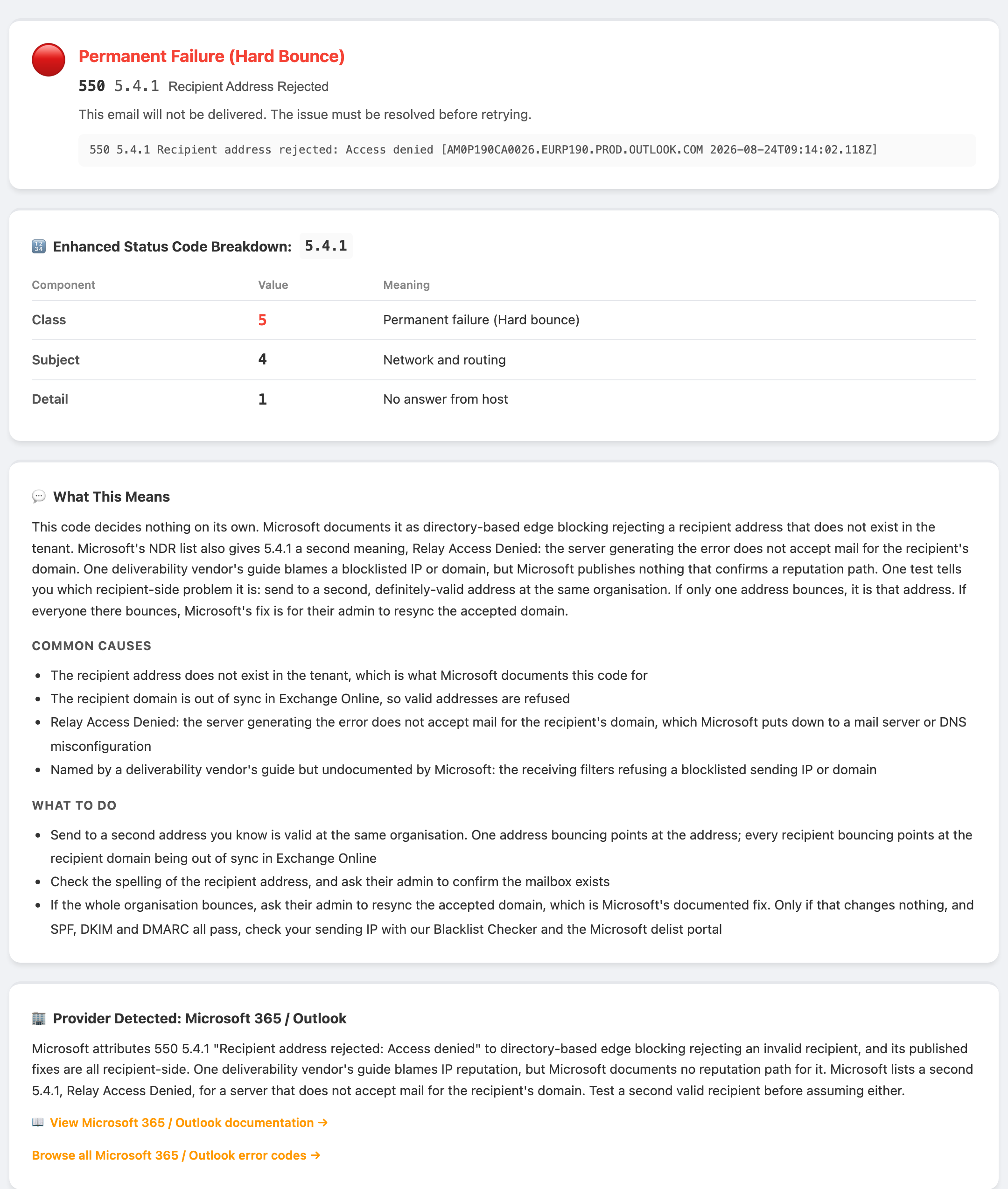
The clearest example is 550 5.4.1 Recipient address rejected: Access denied from Microsoft. Three signals point three ways. The wording blames the address. The middle digit says network and routing. And Microsoft's own page for the code says something else again: the NDR is generated when directory-based edge blocking rejects an incoming message because the recipient's address is invalid9. Every fix on that page is recipient-side: check the spelling, resync the accepted domain, reset the proxy address9. Microsoft's NDR list also has a second 5.4.1, Relay Access Denied, for a mail server that doesn't accept mail for the recipient's domain12.
One deliverability vendor's guide blames 5.4.1 on a blocklisted IP or domain10. Microsoft publishes nothing that confirms a reputation path for 5.4.1, so that reading stays a hypothesis. One test narrows it down in a minute: send to a second, definitely-valid address at the same tenant. One address bouncing points at the address. Every recipient bouncing still points at their side: Microsoft's fix is for their admin to resync the accepted domain9. We took the rest of the Microsoft non-delivery report zoo apart in why Microsoft 365 and Outlook are blocking your mail.
The same trap runs the other way. Google's 5.7.26 bounce hands you the answer in its own text: "Authentication results: DKIM = did not pass SPF [domain-name] with ip: [ip-address] = did not pass."8 The registered meaning of 5.7.26 wouldn't have told you which checks failed. The sentence did. Some providers write a useful one, and you can't tell which kind you're holding until you've read both.
What to do: read the number to place the failure. Read the sentence for the specifics. Read the rejecting host to know whose rules you fell foul of. The number only gives you a category. When the two disagree, go and get a third fact before you change anything.
Which codes matter per provider?
The standard codes are shared. The wrappers around them aren't, and the wrapper tells you who rejected you.
Google / Gmail. Every Gmail error ends with an identifier. Google documents both: gsmtp is appended to every error it issues, and gcdp is appended when the rejection came from a custom rule a Google Workspace administrator wrote8. gcdp is the one that tells you something. A Google Workspace administrator configured this rule, so the fix starts with them, not with your authentication.
Two Google codes are worth memorising. 421 4.7.28 is rate limiting after Gmail sees an unusual rate of mail tied to your IP, your netblock, your SPF or DKIM domain, or a URL in your message body. 421 4.7.29 means one thing only: you connected without TLS8. That one collides head-on: the registry's X.7.29 is an ARC validation failure1. Since February 2024 Google has required SPF or DKIM, valid forward and reverse DNS, TLS, and a Postmaster Tools spam rate under 0.3% from every sender. Over 5,000 messages a day to Gmail, it wants SPF and DKIM both, a DMARC record, alignment and one-click unsubscribe on marketing and subscribed mail. The DMARC policy may be p=none. It just has to exist11.
Microsoft. Exchange Online can name an internal component in the failure text, such as RESOLVER.ADR.RecipientNotFound beside a 5.1.10 or STOREDRV.Deliver beside a 4.3.212. Read the component, then the code. 550 5.7.515 is Outlook.com's high-volume authentication rule. Microsoft's announcement scopes it to the consumer service (hotmail.com, live.com and outlook.com addresses). Its 29 April update says Microsoft decided to reject non-compliant mail on that code instead of sending it to Junk, taking effect on 5 May 2025. An older line higher up the same post still says Junk first13. If you're being blocked delivering to a business tenant, this isn't your code14.
5.7.13 is a trap, because the registry and Microsoft define it two different ways. The registry has it as a sender's account being disabled after it authenticated1. Microsoft's own page for the code describes a public folder configured to refuse external senders15. Read the component and the rest of the sentence. The digits alone will mislead you here.
Yahoo. Rejections can carry a bracketed identifier such as [TSS04] or [TSS05]. Yahoo's error-codes page doesn't define them. It lists causes rather than identifiers. It frames temporary rejections as 421 or 451 and permanent ones as 553 or 55416. In the two bounces we found, one [TSS04] and one [TSS05], the sentence beside the bracket is the same generic one: "temporarily deferred due to unexpected volume or user complaints"17.
Our take: treat the bracket as a reference number for a conversation with Yahoo, not as a diagnosis. Anyone handing you a precise per-code meaning, us included until Yahoo publishes one, is reporting folklore. What you've got is the sentence and the fact that you're being deferred.
Gateways in front of the mailbox. If the rejecting host is *.pphosted.com, you're talking to Proofpoint. *.mimecast.com is Mimecast18. Both sit ahead of the real mail system, so a block there is the gateway's decision, not the mailbox's. Proofpoint, for one, runs its own unblock route19.
Our take: the reporting host in the bounce is worth as much as the code. It tells you whose rules you fell foul of, and so whose delist or unblock process you need.
When should I just retry?
Let your mail server retry on its own when the code is a 4, the cause is on their side, and it's the first time you've seen it.
Fine to leave alone:
4.2.1   mailbox disabled, not accepting messages (Gmail: recipient getting mail too fast)
4.2.2   recipient mailbox full (temporarily)
4.4.1   no answer from host
4.4.2   bad connection, dropped mid-conversation
4.3.2   receiving system not accepting mail right now
Your mail server handles all of those. Do nothing3.
Worth investigating even though it's a 4:
4.7.28and4.7.29from Gmail. Temporary in name only, and not the same problem.4.7.28is Gmail rate limiting what it sees as an unusual rate of unsolicited mail from you, and its text sends you to the sender guidelines.4.7.29is a missing TLS connection. That's a configuration fix on your side8.- Any
4.x.xthat persists past a few hours for one destination. Greylisting is designed to clear on your server's next retry, though the receiver sets that window and some set it long20. 4.4.7in bulk. Delivery time expired: the message sat too long before anyone accepted it3. Don't read4.7.0the same way despite the neighbouring digits. It's "other or undefined security status", and Gmail alone uses it for ten different texts, from a plain try-again and a missing PTR to a low-reputation IP8.
The failure mode here is a mail server quietly retrying a soft block for five days while everyone assumes the mail went out. Check the queue, not the sent folder.
How do I read one without guessing?
To read a bounce without guessing, find four things in it and ignore the rest.
- The
Diagnostic-Code:line. This is the receiving server's verbatim response, and the closest thing in the bounce to a primary source. The prose at the top of the bounce is usually your own mail server's summary. Read the line alongside theAction:,Status:andRemote-MTA:fields: what the reporting server did, the status code, and which remote server answered21. - The enhanced code inside it. The
X.Y.Ztriplet. Class, subject, detail, in that order. - The
Remote-MTA:or reporting host. Who actually said no. It's how you tell a Proofpoint gateway from the mailbox behind it. - The provider tag.
gsmtp,gcdp,[TSS04], aRESOLVER/STOREDRVcomponent. It confirms whose rulebook applies, and in Google's case whether an administrator wrote the rule.
Here's Gmail's documented rejection for unauthenticated mail, reduced to those parts8:
Diagnostic-Code: smtp; 550 5.7.26 This email has been blocked because the
  sender is unauthenticated. Gmail requires all senders to authenticate
  with either SPF or DKIM. Authentication results: DKIM = did not pass
  SPF [example.com] with ip: [192.0.2.10] = did not pass. For instructions
  on setting up authentication, go to Email sender guidelines. - gsmtp
Permanent, policy, more than one authentication check failed, from Google. The two that failed are named and the fix is spelled out.
The SMTP error code directory is the reference, with a page per code and provider notes where a provider uses one its own way.
So what do I actually do?
- First digit. A
4needs patience, a5needs a decision. - Middle digit. It names the category, not the culprit.
X.1.xis the address and usually yours to correct,X.2.xis the recipient's box,X.7.xcan be either side. - Read the number before the sentence. The number places the failure, the sentence supplies the specifics. When they disagree, go and find a third fact.
- Note who rejected you. The reporting host decides which delist or unblock process you need, and a gateway isn't the mail provider.
- If it's
5.7.23or5.7.24, fix SPF: authorise the IP if it's yours, or repair the record that errored out. - If it's
5.7.26, read the sentence for which checks failed before assuming alignment. - If it's
5.7.25, your sending IP has no valid PTR, or the forward lookup doesn't return it. Fix reverse DNS before anything else. - If it's
5.4.1, find out whether every recipient at that tenant bounces or only one, before you touch either your IP reputation or your address book. - If it's
5.7.0or5.7.1, the code doesn't say why. Gmail alone uses5.7.1for header faults, relay refusals and low reputation8, so read the sentence. If it, or a4.7.28, points at reputation or unsolicited mail, check the IP and domain against the blocklists that actually matter, fix the underlying behaviour, then use the provider's own delist route. - Stop the retry loop. A soft block retried for days looks like success from the sender's side. Watch the queue.
Two follow-ons if the code points somewhere specific. A Microsoft NDR that reads like a stack trace is worth taking apart component by component, which the Microsoft piece above does. And if the answer turns out to be reputation, work the handful of lists that gate real delivery rather than filling in every delist form you can find.
Sources checked
Each claim above was checked against the source named here on 24 October 2026. Vendor pages and DNS records change, so re-run the commands rather than trusting the date on this page.
- The registry (last updated 2024-12-06) registers
X.7.28as “Mail flood detected” andX.7.29as “ARC validation failure” (“This status code may be returned when a message fails ARC validation”), nothing like Gmail’s TLS meaning. ItsX.7.28description, “The message appears to be part of a mail flood of similar abusive messages”, is close to Gmail’s rate limiting.X.2.1is “Mailbox disabled, not accepting messages”, where Gmail’s4.2.1is a recipient receiving mail too quickly (source 8). Its X.7 detail codes stop atX.7.30, so there is noX.7.515, and noX.7.32orX.7.40either, both of which Gmail uses (source 8).X.7.13is “User Account Disabled”: “This error code occurs after a successful authentication to a disabled account.” Source: IANA SMTP Enhanced Status Codes registry ↩ - “maximal_queue_lifetime (default: 5d) Consider a message as undeliverable, when delivery fails with a temporary error, and the time in the queue has reached the maximal_queue_lifetime limit.” Source: Postfix postconf(5) ↩
- Class 5: “A permanent failure is one which is not likely to be resolved by resending the message in the current form.” X.1: “These errors can generally be corrected by the sender and retried.” X.2: “Mailbox issues are assumed to be under the general control of the recipient.” X.7: “Security and policy status issues are assumed to be under the control of either or both the sender and recipient.” X.0 and X.5 name no owner (§2). X.1.2: “The destination system specified in the address does not exist or is incapable of accepting mail.” X.2.1 “Mailbox disabled, not accepting messages”, X.2.2 “Mailbox full”, X.3.2 “System not accepting network messages”, X.4.1 “No answer from host”, X.4.2 “Bad connection”, X.4.7 “Delivery time expired” (“The message was considered too old by the rejecting system”), X.7.0 “Other or undefined security status”, X.7.1 “Delivery not authorized, message refused” (§3). Erratum 4368 (X.3.2 spelling) touches none of the sentences quoted here. Source: RFC 3463 §2 and §3 ↩
- “When a submission or SMTP relay server rejects an envelope recipient due to a domain’s null MX record, it SHOULD use a 556 reply code … and a 5.1.10 enhanced status code (Permanent failure: Recipient address has null MX).” For a sender: “SMTP servers that reject mail because a RFC5321.MailFrom or RFC5322.From domain has a null MX record SHOULD use a 550 reply code … and a 5.7.27 enhanced status code (Permanent failure: Sender address has null MX).” No errata. Source: RFC 7505 §4.1 ↩
- X.7.23 “SPF validation failed”, X.7.24 “SPF validation error” (“Used in place of 4.4.3 or 5.5.2, as described in Sections 8.6 and 8.7 of RFC 7208”), X.7.25 “Reverse DNS validation failed”, X.7.26 “Multiple authentication checks failed”: “The particular mechanisms that failed are not specified.” No errata. Source: RFC 7372 §3.2 to §3.4 ↩
- “A ‘permerror’ result means the domain’s published records could not be correctly interpreted” (§2.6.7); “if there are any syntax errors anywhere in the record, check_host() returns immediately with the result ‘permerror’” (§4.6); “SPF implementations MUST limit the total number of those terms to 10 … If this limit is exceeded, the implementation MUST return ‘permerror’” (§4.6.4). On forwarders and mailing lists: “Because SPF evaluation is based on the IP address of the ‘last’ sending SMTP server, the address of the mediator will be used” (§10.3). Rejected erratum 4082 on §8.7 and reported erratum 6595 on §4.6.4 do not change these sentences. Source: RFC 7208 §2.6.7, §4.6, §4.6.4 and §10.3 ↩
- iprev: the client’s IP address is queried for names (“a ‘reverse lookup’ or a ‘PTR’ record query”), then each name is looked up forward, which “will typically result in at least one mapping back to the client’s IP address”. Gmail’s own
5.7.25text says the same: “the sending IP address doesn’t have a PTR record, or the forwarding DNS entry doesn’t reference the sending IP address” (source 8). Source: RFC 8601 §3 ↩ - Google’s table (last updated 2026-10-22): “gsmtp (Google SMTP) is added to all errors. gcdp (Google Custom Domain Policies) is added to errors resulting from customized rules created by a Google Workspace administrator”, with the example “550 5.7.1 This message violates example.com email policy. - gcdp <sessionid> - gsmtp”. Three
5.7.26rows: “This email has been blocked because the sender is unauthenticated … Authentication results: DKIM = did not pass SPF [domain-name] with ip: [ip-address] = did not pass”, an SPF record “with a hard fail policy (-all)”, and “not accepted due to domain’s DMARC policy”.4.7.28: “Gmail has detected an unusual rate of unsolicited email originating from your” IP, IP Netblock, DKIM domain or SPF domain, or “containing one of your URL domains”, each pointing to Email sender guidelines.4.7.29, its only row: “Your email has been rate limited because you’re not using a TLS connection.”5.7.24: “The SPF record of the sending domain has one or more suspicious entries.” Codes outside the registry, such as “421 4.7.32 Your email has been rate limited because the From: header (RFC5322) in this message isn’t aligned” and “550 5.7.40 Your message was blocked because the sending domain doesn’t have a DMARC record”. Ten4.7.0rows, including “Try again later, closing connection”, “does not have a PTR record” and “the very low reputation of the sending IP address”.4.2.1: “The user you are trying to contact is receiving email too quickly.”5.7.1rows cover header faults (“Messages missing a valid Message-ID: header are not accepted”), relay (“Use the SMTP relay at your service provider instead”) and reputation (“the very low reputation of the sending IP address”). Source: Google Workspace Help: Gmail SMTP errors and codes ↩ - Exchange Online page (ms.date 2026-10-02): “The NDR is generated when directory-based edge blocking in Microsoft Exchange Online blocks an incoming email message because the recipient’s email address is invalid.” Its fixes, all for “an email administrator in the recipient’s organization”: check the spelling; “Determine whether the issue affects only one recipient or everyone in the recipient’s domain”; “If the issue affects all recipients in the domain, follow these steps to resync the domain”; “reset the SMTP proxy address of the recipient’s mailbox”. The old support.microsoft.com URL now redirects here. Source: Microsoft Learn: Fix NDR error 550 5.4.1 in Exchange Online ↩
- A deliverability vendor’s guide (published 2024-11-25) lists “You’ve Been Blacklisted by the Recipient’s Email Service Provider (ESP)” as a cause: “Sending emails in this situation will lead to the 550 5.4.1 recipient address error and other 550 error codes.” Microsoft’s page (source 9) names no such cause. Source: InboxAlly: 550 5.4.1 Recipient Address Rejected ↩
- “Starting February 1, 2024, all email senders who send email to Gmail accounts must meet the requirements in this section”: SPF or DKIM, “valid forward and reverse DNS records”, “Use a TLS connection”, “Keep spam rates reported in Postmaster Tools below 0.3%”. Over 5,000 a day: “Set up SPF and DKIM”, “Set up DMARC”, “Your DMARC enforcement policy can be set to none”, From aligned “with either the SPF domain or the DKIM domain”, and “Marketing messages and subscribed messages must support one-click unsubscribe”. The same page separately advises “below 0.10% and avoid ever reaching a spam rate of 0.30% or higher”. No page date found in the raw copy; checked 2026-10-24. Source: Gmail Help: Email sender guidelines ↩
- “550 5.1.10 RESOLVER.ADR.RecipientNotFound; Recipient not found by SMTP address lookup” (ms.date 2024-01-24), and “432 4.3.2 STOREDRV.Deliver; recipient thread limit exceeded” in Microsoft’s NDR list (ms.date 2026-08-24). The same list: “5.4.1 Relay Access Denied The mail server that's generating the error doesn't accept mail for the recipient's domain.” Neither page, nor a Microsoft Learn search for the component names, defines what each component covers. Source: Microsoft Learn: NDR error 550 5.1.10 and Microsoft Learn: Email NDRs and SMTP errors in Exchange Online ↩
- Published 2 April 2025, modified 30 April 2025: “This applies to Outlook.com - our consumer service, which is supporting hotmail.com live.com and outlook.com consumer domain addresses.” Enforcement Timeline: “we have made a decision to reject messages that don’t pass the required authentication requirements detailed above. The rejected messages will be designated as ‘550; 5.7.515 Access denied …’ This change will state taking effect on May 5th as originally stated.” The following paragraph about routing to Junk with rejection “(date to be announced)” is wrapped in
<DEL>in the raw markup, so it is struck through. Still live higher up, under “What’s Changing?”: “Non‐compliant messages will first be routed to Junk.” Read from a Chrome-user-agent copy. Source: Microsoft Defender for Office 365 Blog: Outlook’s New Requirements for High-Volume Senders ↩ - The sender-facing page (ms.date 05/02/2025) covers mail sent “to Outlook.com and related Microsoft consumer email services (Hotmail, Live.com, MSN, etc.)” and says “This error indicates your message was rejected”. Microsoft’s Exchange Online NDR list (source 12) has no
5.7.515entry (searched the raw copy, 2026-10-24). Source: Microsoft Support: Fix NDR error 550 5.7.515 in Outlook.com ↩ - “You’ll see this automated notification when the recipient is a public folder that’s configured to reject messages from external senders (senders from outside the organization).” (ms.date 2026-08-10). Neither this page nor the NDR list mentions AccountDisabledException. Source: Microsoft Learn: Fix NDR error 5.7.13 or 5.7.135 in Exchange Online ↩
- “A 421 or 451 SMTP error indicates a temporary problem”; “A 553 or 554 SMTP error indicates an email could not be delivered due to a permanent problem.” The page lists causes and contains no
TSSorTSidentifier (searched the raw copy, 2026-10-24). Thepostmaster.yahooinc.com/error-codeslink printed in the bounces below lands on the same content. Source: Yahoo Sender Hub: SMTP error codes ↩ - “421 4.7.0 [TSS04] Messages from ********* temporarily deferred due to unexpected volume or user complaints - 4.16.55.1” (Secuserve FAQ, which calls TSS04 “internal Yahoo code may not be publicly documented”), and “421 4.7.0 [TSS05] Messages from x.x.x.x temporarily deferred due to unexpected volume or user complaints - 4.16.55.1” (Fortinet Community, 4 March 2025). Source: Secuserve FAQ: Deferred Yahoo 421 4.7.0 [TSS04] and Fortinet Community: 421 4.7.0 [TSS05] ↩
- Each vendor’s own domain receives mail through those hosts. As it resolved on 24 October 2026:
proofpoint.comMXmxa-00148501.gslb.pphosted.com,mxb-00148501.gslb.pphosted.com,mx0a-00148501.pphosted.com,mx0b-00148501.pphosted.com;mimecast.comMXservice-alpha-inbound-a.mimecast.com,service-alpha-inbound-b.mimecast.com. Source:dig +short MX proofpoint.comanddig +short MX mimecast.com↩ - Proofpoint runs its own process: “If your IP address is currently on our IP blocklist, or your IP is experiencing sending delays, this lookup will provide a means to submit information about your IP to Proofpoint.” Mimecast’s process was not checked. Source: Proofpoint: Dynamic Reputation IP Lookup ↩
- “Include a configurable range of time within which a retry from a greylisted host is considered … The default range SHOULD be from one minute to 24 hours. … Some sites use a higher time value for the low end of the time range”. No errata. Source: RFC 6647 §5 ↩
- The Action field “indicates the action performed by the Reporting-MTA as a result of its attempt to deliver the message” (§2.3.3); Status “contains a transport-independent status code” (§2.3.4); Remote-MTA is “the name of the ‘remote’ MTA that reported delivery status” (§2.3.5); Diagnostic-Code “contains the actual diagnostic code issued by the mail transport” (§2.3.6). The per-recipient grammar lists Action, Status and Remote-MTA before Diagnostic-Code (§2.3), and “The first component of the multipart/report contains a human-readable explanation of the DSN” (§2). Errata 2965 and 8285 touch Appendix E and D only. Source: RFC 3464 §2.3.3 to §2.3.6 ↩